Managing Python environments has always been a fragmented experience—juggling venv, conda, pyenv, poetry, and pipenv often leads to confusion and lost time. The newly released Python Environments Extension for VS Code changes that by providing a unified, streamlined workflow for handling environments, interpreters, and packages all in one place. After a year in preview, refined by community feedback, this extension is now generally available. It works seamlessly alongside the existing Python extension, requiring no extra setup—just open a Python file and your environments are automatically discovered. In the coming weeks, most users will have their environment workflows automatically switched to this extension, or they can opt in immediately with the python.useEnvsExtension setting. Curious about what it offers? Here are eight essential features you need to know about.
1. A Unified Environment Experience
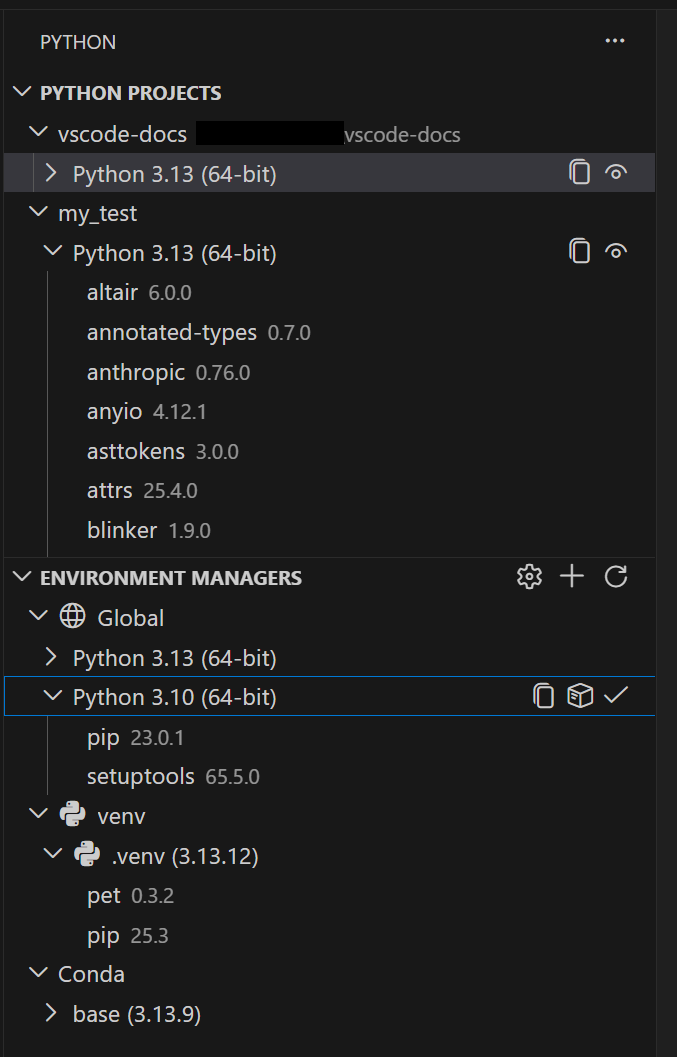
Gone are the days of toggling between different tools to manage environments. The extension brings all major environment managers—venv, conda, pyenv, poetry, and pipenv—under one roof. You can create, delete, switch, and manage environments from a single interface, regardless of which tool originally created them. This unification eliminates the mental overhead of remembering which CLI commands work with which tool. The extension automatically discovers environments from all these managers, plus any system Python installs, so everything appears in one consistent view. Whether you're a data scientist using conda or a web developer using pipenv, the same intuitive UI greets you.
2. Fast, Reliable Environment Discovery with PET
Under the hood, the extension uses PET (Python Environment Tool), a Rust-based scanner that finds environments quickly and reliably across all platforms. PET checks your PATH, well-known installation directories, and any custom search paths you configure. This same engine already powers environment discovery in the standard Python extension, so you're getting a proven foundation—now with a dedicated user interface. The scanning is lightning-fast, making it feel like your environments are always there when you need them. For environments in non‑standard locations, you can set workspace-level search paths using glob patterns or define global search paths for shared directories outside your project.
3. Faster Environment Creation with uv
If you have uv installed on your system, the extension automatically uses it to create venv environments and install packages. UV is significantly faster than traditional tools, especially in large projects with many dependencies. This optimization is enabled by default via the python-envs.alwaysUseUv setting, so you get speed boosts without any extra configuration. For users who prefer not to rely on uv or don't have it installed, the extension falls back to the default methods seamlessly. This is a perfect example of how the extension leverages modern tooling to accelerate everyday tasks.
4. Quick Create: Instant Environment Setup
Need a new environment up and running in seconds? The Quick Create feature is just a click away—simply press the + button in the Environment Managers view. It builds an environment using your default manager, the latest Python version, and automatically picks up any workspace dependencies found in requirements.txt or pyproject.toml. You don't have to think about options; it just works. This is ideal for new projects or quick experiments where you want a working environment without diving into configuration.
5. Custom Create for Full Control
When you need more flexibility, Custom Create is accessible via the command palette (Python: Create Environment). It lets you choose the environment manager (venv or conda for direct creation; pyenv, poetry, pipenv for discovery after CLI creation), specify the Python version, give the environment a name, and select which dependency files to install from. This level of control is invaluable for complex setups or when you need to match an environment to a specific project configuration. The UI guides you through each step, making even advanced setups straightforward.

6. Python Projects: Environments Aligned with Your Code
One of the trickiest scenarios in Python development is managing multiple environments in a monorepo—a single repository containing several projects. The extension introduces Python Projects, which allow you to map environments to specific folders or files within your workspace. This means that when you open a particular Python file or directory, VS Code automatically activates the correct environment. No more guessing which environment corresponds to which subproject. The mapping is intuitive: you define folder or file‑level associations, and the extension takes care of the rest. This is a game‑changer for teams working on multi‑service applications or microservices.
7. No Setup Required – Works Out of the Box
Perhaps the most user‑friendly aspect is that the extension requires zero configuration to get started. Once installed, it works alongside the existing Python extension and begins discovering environments as soon as you open any Python file. There is no need to create settings files, run setup scripts, or install additional tools. For most developers, everything just works. If you have environments in non‑standard directories, you can easily add search paths later, but the default behavior covers the vast majority of use cases. This low barrier to entry makes it perfect for beginners and experts alike.
8. Gradual Rollout and Easy Opt‑In
Because such a significant change can be disruptive, Microsoft is rolling out the extension gradually. In the next few weeks, all users will be automatically switched to the new environment workflow. However, if you're eager to try it now, you can opt in immediately by setting python.useEnvsExtension to true. Once enabled, all environment operations—creation, deletion, switching, and discovery—are handled by the extension. The migration is smooth: your existing environments remain intact, and the extension simply takes over management. This thoughtful rollout ensures that even large teams can adopt the new system without breaking existing setups.
The Python Environments Extension for VS Code finally delivers the unified, intuitive environment management that Python developers have been waiting for. From automatic discovery and fast creation with uv to the ability to map environments to specific parts of a monorepo, every feature is designed to save time and reduce friction. Whether you're a solo developer or part of a large team, this extension will change how you think about Python environments. Give it a try and see how much faster your workflow becomes.